 下载Demo
项目准备:
1. 安装Oracle 10g, 或者 Oracle 11g 【安装教程】
2. 配置jdbc连接信息, 将下载的项目中的连接信息换成本地信息
3. 项目是maven工程,需要配置相应的maven信息 【安装教程】
4. ojdbc-14.jar包引用到工程中
5. 实例中涉及二张表 student(学生信息), parent(学生家长信息)
学生信息有数据的增删改查, 家长信息有两表的关联查询,用来查询学生及学生父母信息
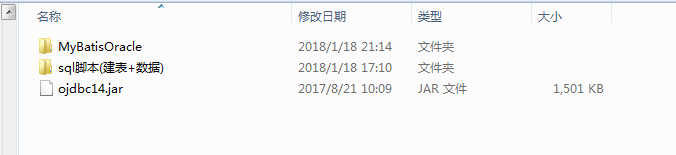
6. 下载项目, 项目包含文件(代码, sql脚本, jar包)
1. maven本地jar包引入
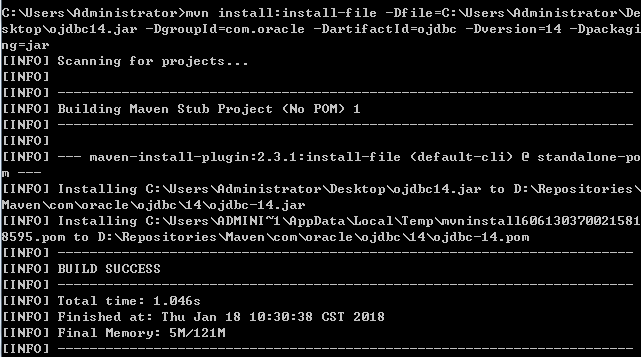
由于ojdbc-14.jar通过在pom.xml的配置信息无法下载, 但又想通过maven方式引入,可以通过maven jar包本地化,
准备一个ojdbc-14.jar, 目录为C:\Users\Administrator\Desktop\ojdbc14.jar,通过下面的命令将ojdbc-14.jar装载到maven本地仓库
mvn install:install-file -Dfile=C:\Users\Administrator\Desktop\ojdbc14.jar -DgroupId=com.oracle -DartifactId=ojdbc -Dversion=14 -Dpackaging=jar
对应的 pom 信息为
<dependency>
<groupId>com.oracle</groupId> ----DgroupId
<artifactId>ojdbc</artifactId> ----DartifactId
<version>14</version> ----Dversion
</dependency>
2. 项目代码
2.1 数据源配置
jdbc.properties(连接本地的oracle数据库), 将下面url, username, password 换成你本地的信息
driver=oracle.jdbc.OracleDriver
#url=jdbc:mysql://localhost:3306/hctl?characterEncoding=utf-8
url=jdbc:oracle:thin:@127.0.0.1:1521:MYORACLE
#url=jdbc:mysql://www.ad186.com:3306/hctl?characterEncoding=utf-8
username=gepanjiang
password=ajqnhwvia
#username=root
#password=ajqnhwvia

#\u5b9a\u4e49\u521d\u59cb\u8fde\u63a5\u6570
initialSize=0
#\u5b9a\u4e49\u6700\u5927\u8fde\u63a5\u6570
maxActive=20
#\u5b9a\u4e49\u6700\u5927\u7a7a\u95f2
maxIdle=20
#\u5b9a\u4e49\u6700\u5c0f\u7a7a\u95f2
minIdle=1
#\u5b9a\u4e49\u6700\u957f\u7b49\u5f85\u65f6\u95f4
maxWait=6000000
2.2 spring信息配置
<?xml version="1.0" encoding="UTF-8"?>
<beans xmlns="http://www.springframework.org/schema/beans"
	xmlns:mvc="http://www.springframework.org/schema/mvc" xmlns:xsi="http://www.w3.org/2001/XMLSchema-instance"
	xmlns:context="http://www.springframework.org/schema/context"
	xmlns:aop="http://www.springframework.org/schema/aop" xmlns:p="http://www.springframework.org/schema/p"
	xmlns:tx="http://www.springframework.org/schema/tx" xmlns:jdbc="http://www.springframework.org/schema/jdbc"
	xsi:schemaLocation="http://www.springframework.org/schema/beans
            http://www.springframework.org/schema/beans/spring-beans-4.3.xsd
            http://www.springframework.org/schema/context
            http://www.springframework.org/schema/context/spring-context-4.3.xsd
            http://www.springframework.org/schema/tx
            http://www.springframework.org/schema/tx/spring-tx-4.3.xsd
            http://www.springframework.org/schema/mvc
            http://www.springframework.org/schema/mvc/spring-mvc-4.3.xsd
            http://www.springframework.org/schema/aop
            http://www.springframework.org/schema/aop/spring-aop-4.3.xsd">

	<context:component-scan base-package="com.main">
		<context:exclude-filter type="annotation" expression="org.springframework.stereotype.Controller"/>
	</context:component-scan>

	<!-- 数据库连接池配置 -->
	<bean id="propertyConfigurer" class="org.springframework.beans.factory.config.PropertyPlaceholderConfigurer">
		<property name="location" value="classpath:jdbc.properties" />
	</bean>
	<bean id="dataSource" class="org.apache.commons.dbcp.BasicDataSource" destroy-method="close">
		<property name="driverClassName" value="${driver}" />
		<property name="url" value="${url}" />
		<property name="username" value="${username}" />
		<property name="password" value="${password}" />
		<!-- 初始化连接大小 -->
		<property name="initialSize" value="${initialSize}"></property>
		<!-- 连接池最大数量 -->
		<property name="maxActive" value="${maxActive}"></property>
		<!-- 连接池最大空闲 -->
		<property name="maxIdle" value="${maxIdle}"></property>
		<!-- 连接池最小空闲 -->
		<property name="minIdle" value="${minIdle}"></property>
		<!-- 获取连接最大等待时间 -->
		<property name="maxWait" value="${maxWait}"></property>
	</bean>

	<!-- spring和mybatis的整合 -->
	<bean id="sqlSessionFactory" class="org.mybatis.spring.SqlSessionFactoryBean">
		<property name="dataSource" ref="dataSource" />
		<!-- 自动扫描mapping.xml文件(sql语句) -->
		<property name="mapperLocations" value="classpath:/com/main/dao/*.xml"></property>
		<!-- 用于分页 -->
		<property name="plugins">
			<list>
				<bean class="com.github.miemiedev.mybatis.paginator.OffsetLimitInterceptor">
					<property name="dialectClass" value="com.github.miemiedev.mybatis.paginator.dialect.OracleDialect"></property>
				</bean>
			</list>
		</property>
	</bean>

	<!-- 注解的DAO接口包,自动扫描 -->
	<bean class="org.mybatis.spring.mapper.MapperScannerConfigurer">
		<!--  <property name="basePackage" value="com.lzjy.sqlmaps.dao" />-->
		<property name="basePackage" value="com.main.dao" />
		<property name="sqlSessionFactoryBeanName" value="sqlSessionFactory" />
	</bean>


	<!-- 配置事务特性 -->
	<bean id="txManager"
		class="org.springframework.jdbc.datasource.DataSourceTransactionManager">
		<property name="dataSource" ref="dataSource" />
	</bean>
	<tx:advice id="txAdvice" transaction-manager="txManager">
		<tx:attributes>
			<!-- 必须要rollback-for才能事务回滚 -->
			<tx:method name="add*"    propagation="REQUIRED" read-only="false" rollback-for="java.lang.Exception"/>
			<tx:method name="insert*" propagation="REQUIRED" read-only="false" rollback-for="java.lang.Exception"/>
			<tx:method name="update*" propagation="REQUIRED" read-only="false" rollback-for="java.lang.Exception"/>
			<tx:method name="delete*" propagation="REQUIRED" read-only="false" rollback-for="java.lang.Exception"/>
			<tx:method name="del*"    propagation="REQUIRED" read-only="false" rollback-for="java.lang.Exception"/>
			<tx:method name="*"       read-only="true" />
		</tx:attributes>
	</tx:advice>

	<aop:config>
		<aop:pointcut id="serviceMethod" expression="execution(* com.main.service.*.*(..))" />
		<aop:advisor advice-ref="txAdvice" pointcut-ref="serviceMethod" />
	</aop:config>
</beans>
2.3 用户实体信息, 此实体信息包括下面的sql语句 可以根据自动工具生成 【查看工具】
package com.main.model;

import java.util.Date;

public class Student {
    /**
     * null
     */
    private String studentNo;

    /**
     * null
     */
    private String studentName;

    /**
     * null
     */
    private Short age;

    /**
     * null
     */
    private Date birthday;

    /**
     * null
     */
    private String sex;

    /**
     * null
     * @return STUDENT_NO null
     */
    public String getStudentNo() {
        return studentNo;
    }

    /**
     * null
     * @param studentNo null
     */
    public void setStudentNo(String studentNo) {
        this.studentNo = studentNo == null ? null : studentNo.trim();
    }

    /**
     * null
     * @return STUDENT_NAME null
     */
    public String getStudentName() {
        return studentName;
    }

    /**
     * null
     * @param studentName null
     */
    public void setStudentName(String studentName) {
        this.studentName = studentName == null ? null : studentName.trim();
    }

    /**
     * null
     * @return AGE null
     */
    public Short getAge() {
        return age;
    }

    /**
     * null
     * @param age null
     */
    public void setAge(Short age) {
        this.age = age;
    }

    /**
     * null
     * @return BIRTHDAY null
     */
    public Date getBirthday() {
        return birthday;
    }

    /**
     * null
     * @param birthday null
     */
    public void setBirthday(Date birthday) {
        this.birthday = birthday;
    }

    /**
     * null
     * @return SEX null
     */
    public String getSex() {
        return sex;
    }

    /**
     * null
     * @param sex null
     */
    public void setSex(String sex) {
        this.sex = sex == null ? null : sex.trim();
    }
}
学生家长实体bean
package com.main.model;

public class StudentParent {
	private String studentNo;
    private String studentName;
    private String fatherName;
    private String montherName;
	public String getStudentNo() {
		return studentNo;
	}
	public void setStudentNo(String studentNo) {
		this.studentNo = studentNo;
	}
	public String getStudentName() {
		return studentName;
	}
	public void setStudentName(String studentName) {
		this.studentName = studentName;
	}
	public String getFatherName() {
		return fatherName;
	}
	public void setFatherName(String fatherName) {
		this.fatherName = fatherName;
	}
	public String getMontherName() {
		return montherName;
	}
	public void setMontherName(String montherName) {
		this.montherName = montherName;
	}


}
2.4 由于查询数据库使用了mybatis,所以mapper.xml信息必不可少
<?xml version="1.0" encoding="UTF-8"?>
<!DOCTYPE mapper PUBLIC "-//mybatis.org//DTD Mapper 3.0//EN" "http://mybatis.org/dtd/mybatis-3-mapper.dtd">
<mapper namespace="com.main.dao.StudentMapper">
  <resultMap id="BaseResultMap" type="com.main.model.Student">
    <id column="STUDENT_NO" jdbcType="VARCHAR" property="studentNo" />
    <result column="STUDENT_NAME" jdbcType="VARCHAR" property="studentName" />
    <result column="AGE" jdbcType="DECIMAL" property="age" />
    <result column="BIRTHDAY" jdbcType="DATE" property="birthday" />
    <result column="SEX" jdbcType="CHAR" property="sex" />
  </resultMap>

  <resultMap id="BaseStudentParent" type="com.main.model.StudentParent">
  	<id column="STUDENT_NO" property="studentNo" jdbcType="VARCHAR" />
    <result column="STUDENT_NAME" property="studentName" jdbcType="VARCHAR" />
    <result column="FATHER_NAME" property="fatherName" jdbcType="VARCHAR"/>
   	<result column="MONTHER_NAME" property="montherName" jdbcType="VARCHAR"/>
  </resultMap>


  <sql id="Base_Column_List">
    STUDENT_NO, STUDENT_NAME, AGE, BIRTHDAY, SEX
  </sql>

  <select id="selectByPrimaryKey" parameterType="java.lang.String" resultMap="BaseResultMap">
  		select
	    <include refid="Base_Column_List" />
	    from STUDENT
	    where STUDENT_NO = #{studentNo,jdbcType=VARCHAR}
  </select>

  <!-- 分页查询 -->
  <select id="queryPageStudent" parameterType="com.main.model.Student" resultMap="BaseResultMap">
		select
	    <include refid="Base_Column_List" />
	    from STUDENT
	    where 1=1
	    <if test="studentNo != null" >
	      AND STUDENT_NO = #{studentNo,jdbcType=VARCHAR}
	    </if>
	    <if test="studentName != null" >
	      AND STUDENT_NAME = #{studentName,jdbcType=VARCHAR}
	    </if>
	    <if test="age != null" >
	      AND AGE = #{age,jdbcType=DECIMAL}
	    </if>
	    <if test="sex != null" >
	      AND SEX = #{sex,jdbcType=CHAR}
	    </if>
  </select>


  <delete id="deleteByPrimaryKey" parameterType="java.lang.String">
    delete from STUDENT
    where STUDENT_NO = #{studentNo,jdbcType=VARCHAR}
  </delete>

  <insert id="insert" parameterType="com.main.model.Student">
    insert into STUDENT (STUDENT_NO, STUDENT_NAME, AGE,
      BIRTHDAY, SEX)
    values (#{studentNo,jdbcType=VARCHAR}, #{studentName,jdbcType=VARCHAR}, #{age,jdbcType=DECIMAL},
      #{birthday,jdbcType=DATE}, #{sex,jdbcType=CHAR})
  </insert>

  <insert id="insertSelective" parameterType="com.main.model.Student">
    insert into STUDENT
    <trim prefix="(" suffix=")" suffixOverrides=",">
      <if test="studentNo != null">
        STUDENT_NO,
      </if>
      <if test="studentName != null">
        STUDENT_NAME,
      </if>
      <if test="age != null">
        AGE,
      </if>
      <if test="birthday != null">
        BIRTHDAY,
      </if>
      <if test="sex != null">
        SEX,
      </if>
    </trim>
    <trim prefix="values (" suffix=")" suffixOverrides=",">
      <if test="studentNo != null">
        #{studentNo,jdbcType=VARCHAR},
      </if>
      <if test="studentName != null">
        #{studentName,jdbcType=VARCHAR},
      </if>
      <if test="age != null">
        #{age,jdbcType=DECIMAL},
      </if>
      <if test="birthday != null">
        #{birthday,jdbcType=DATE},
      </if>
      <if test="sex != null">
        #{sex,jdbcType=CHAR},
      </if>
    </trim>
  </insert>

  <update id="updateByPrimaryKeySelective" parameterType="com.main.model.Student">
    update STUDENT
    <set>
      <if test="studentName != null">
        STUDENT_NAME = #{studentName,jdbcType=VARCHAR},
      </if>
      <if test="age != null">
        AGE = #{age,jdbcType=DECIMAL},
      </if>
      <if test="birthday != null">
        BIRTHDAY = #{birthday,jdbcType=DATE},
      </if>
      <if test="sex != null">
        SEX = #{sex,jdbcType=CHAR},
      </if>
    </set>
    where STUDENT_NO = #{studentNo,jdbcType=VARCHAR}
  </update>

  <update id="updateByPrimaryKey" parameterType="com.main.model.Student">
    update STUDENT
    set STUDENT_NAME = #{studentName,jdbcType=VARCHAR},
      AGE = #{age,jdbcType=DECIMAL},
      BIRTHDAY = #{birthday,jdbcType=DATE},
      SEX = #{sex,jdbcType=CHAR}
    where STUDENT_NO = #{studentNo,jdbcType=VARCHAR}
  </update>

  <!-- 查询学生及父母亲 -->
  <select id="queryStudentParent" resultMap="BaseStudentParent" parameterType="java.lang.String">
 	select m.student_no, m.student_name, n.father_name, n.monther_name
 	from student m left join parent n on m.student_no=n.student_no where m.student_no = #{studentNo,jdbcType=VARCHAR}
  </select>
</mapper>
2.5 后台框架对接前台使用的springmvc, controller层代码如下:
package com.main.controller;

import java.util.Date;
import java.util.List;

import javax.servlet.http.HttpServletResponse;

import org.springframework.beans.factory.annotation.Autowired;
import org.springframework.stereotype.Controller;
import org.springframework.ui.ModelMap;
import org.springframework.web.bind.annotation.RequestMapping;
import org.springframework.web.bind.annotation.ResponseBody;

import com.github.miemiedev.mybatis.paginator.domain.PageBounds;
import com.github.miemiedev.mybatis.paginator.domain.PageList;
import com.main.model.Student;
import com.main.model.StudentParent;
import com.main.service.StudentService;
import com.main.util.Result;
import com.main.util.StrDateUtil;

@Controller
@RequestMapping("/student")
public class StudentController {

	@Autowired
	private StudentService studentService;

	public StudentController() {
		System.out.println("StudentController构造函数");
	}

	//访问此资源的url:  http://localhost:8080/MyBatisOracle/student/queryPageStudent.htm?page=1&limit=5
	@RequestMapping("/queryPageStudent.htm")
    public String queryStudent(ModelMap map, PageBounds pageBounds)
    {
		//查询总数目
		pageBounds.setContainsTotalCount(true);
		Student studentCondition = new Student();
		List<Student> lstStudents = studentService.queryPageStudent(studentCondition, pageBounds);

		/*获得总页数        如果page=1&limit=5 未设置,下面强转会失败*/
    	PageList pageList = (PageList)lstStudents;
    	System.out.println("totalCount: " + pageList.getPaginator().getTotalCount());
    	map.put("lstStudent", lstStudents);
    	map.put("total", pageList.getPaginator().getTotalCount());
    	return "studentList";
    }

	//访问此资源的url:  http://localhost:8080/MyBatisOracle/student/addStudent.htm
	@RequestMapping("/addStudent.htm")
	@ResponseBody
    public Result addStudent(ModelMap map, HttpServletResponse response)
    {
		Result result = new Result();
		Student student = new Student();
		student.setStudentNo(StrDateUtil.getCurrentTimeToString2());
		student.setAge(Short.parseShort("10"));
		student.setStudentName("ge-pan-jiang");
		student.setSex("1");
		student.setBirthday(new Date());
		int nCount = studentService.addStudent(student);
		if(nCount == 1){
			result.setDesc("插入成功");
			result.setStateCode("0");
		}else{
			result.setDesc("插入失败");
			result.setStateCode("-1");
		}
		return result;
    }


	//访问此资源的url:  http://localhost:8080/MyBatisOracle/student/delStudent.htm
	@RequestMapping("/delStudent.htm")
	@ResponseBody
    public Result delStudent(ModelMap map, HttpServletResponse response)
    {
		Result result = new Result();
		int nCount = studentService.delStudent("000001");
		if(nCount == 1){
			result.setDesc("删除成功");
			result.setStateCode("0");
		}else{
			result.setDesc("删除失败");
			result.setStateCode("-1");
		}
		return result;
    }

	//查询学生父母亲 (联表查询【student, parent】)
	//访问此资源的url:  http://localhost:8080/MyBatisOracle/student/queryStudentParent.htm
	@RequestMapping("/queryStudentParent.htm")
	@ResponseBody
    public Result queryStudentParent(ModelMap map, HttpServletResponse response)
    {
		Result result = new Result();
		StudentParent studentParent = studentService.queryStudentParent("000002");
		result.setStateCode("0");
		result.setDesc("查询学生父母亲");
		result.setData(studentParent);
		return result;
    }


	/**
	 * 测试事务
	 * 访问此资源的url:  http://localhost:8080/MyBatisPage/user/testUserTransaction.htm
	 */
	@RequestMapping("/testUserTransaction.htm")
	@ResponseBody
    public Result testUserTransaction(ModelMap map, HttpServletResponse response)
    {
		Result result = new Result();
		/*try{
			userService.addUserTransaction();
		}catch(Exception e){
			e.printStackTrace();
		}


		result.setStateCode("0");
		result.setDesc("查询成功");*/
		return result;
    }

	//测试函数
	public static void main(String[] args)
	{
		// TODO Auto-generated method stub
	}

}
-------------------------------------------------------------------------------------------------------------------------------------------------------------------------------------------------------------------------------------------------------------------------------------------------------------------------------------------------------------------------------------------------------------------------------------------------------------------------------------------------------------------------------------------------------------------------------------